


Planning Control
Connect the invoice back to the order and quantities behind the shipment.
Powered by GoOrdersExplore morePayment Control, powered by GoInvoice
Check invoices against agreed rates, contracts, shipment evidence, currencies, and tolerances so teams can catch overcharges, resolve discrepancies faster, and pay with confidence.
See GoInvoice in action
Trusted by global enterprises
Trusted by global enterprises


Connected across your logistics network
5000+ carrier integrations
Connected across your logistics network5000+ carrier integrations


Freight invoices have to be checked against rates, contracts, shipment records, currencies, supporting documents, and exceptions.
When that context sits across different systems and spreadsheets, finance ends up checking everything manually.
The invoice arrives in Finance, while the awarded rate or contract sits with Procurement or Logistics.
Bills of lading, movement dates, free days, and supporting documents often need to be collected before a charge can be verified.
Finance checks thousands of valid charge lines just to find the few that require review.
Teams spend more time reconstructing why a charge is wrong before they can challenge it.

GoInvoice matches every charge against agreed terms and shipment evidence so teams review only the discrepancies that need attention before payment.
Keep every charge connected to the agreement and shipment evidence behind it.
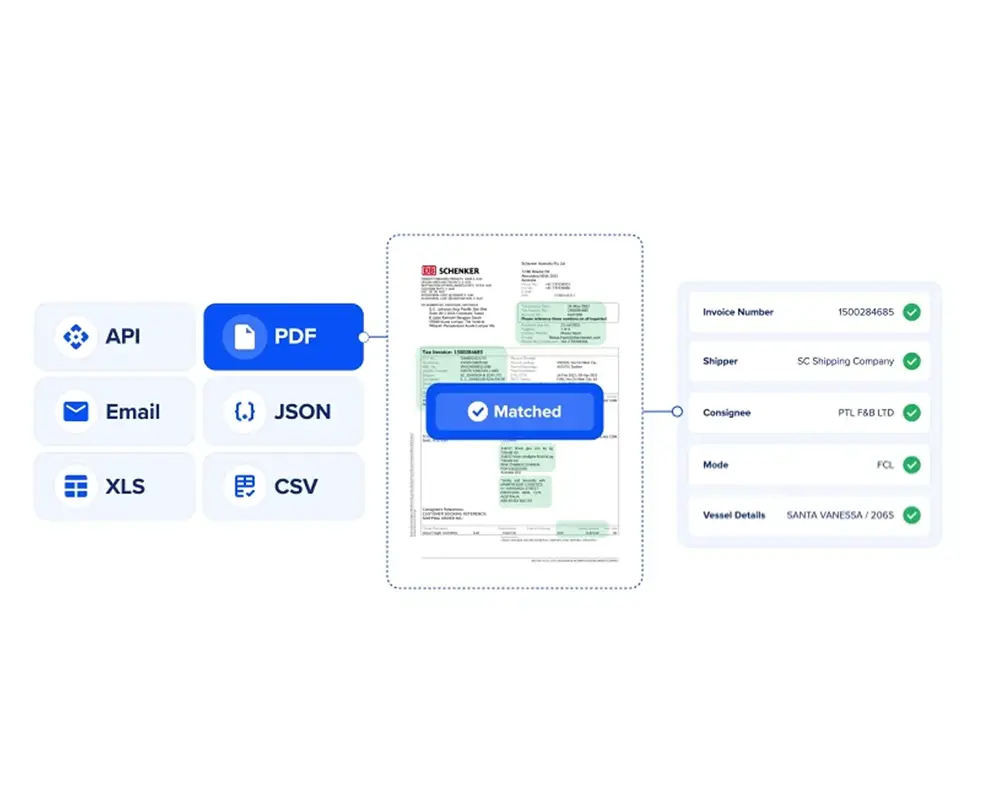
Finance starts with the exceptions, not the full invoice.
Follow an invoice through GoInvoiceNova connects GoInvoice with your commercial terms, tolerances, approval rules, and dispute process. It helps make sure discrepancies reach the right reviewer with the evidence needed to make a decision.
Check this invoice before it gets approved. Are we being overcharged?
Structure the invoice, match every charge, review only the exceptions, and dispute or approve with the evidence already attached.
Capture shipment references, currencies, taxes, freight charges, accessorials, and other billing information in a structured format.
OutcomeStart with usable invoice data instead of manual entry.

Compare invoice lines with the applicable commercial terms and shipment evidence.
OutcomeIdentify overcharges and unsupported charges before approval.

Apply configured tolerances to separate matched charges from material discrepancies.
OutcomeFinance spends time on exceptions instead of auditing every line.

Keep the billed charge, agreed terms, shipment evidence, discussion, and final decision connected.
OutcomeResolve disputes faster and move clean invoices forward without unnecessary delay.

Connect the invoice back to the order and quantities behind the shipment.
Powered by GoOrdersExplore more
Provide the awarded rate, commercial terms, and approved freight partner.
Powered by GoProcureExplore more
Provide the shipment documents and operational evidence required for validation.
Powered by GoShipment + DRDVExplore more
Provide movement dates, container activity, and free-time context.
Powered by GoTrackExplore moreProvide relevant disruption context when unusual costs or route changes need explanation.
Powered by Market IntelligenceExplore more
Match billed charges against what was agreed and what actually happened.
Powered by GoInvoiceExplore morePayment Control confirms whether the commercial decision made upstream was honoured at settlement.
Explore the Freight Control EngineYour ERP continues to manage financial records and payment. GoInvoice adds the freight-specific matching, tolerance, exception, and dispute process before an invoice moves forward.
Configure around
Does every billed charge match what was agreed and supported by the shipment?
Should the exception be approved, disputed, or sent back for more information?
Freight Payment Control checks billed freight charges against agreed commercial terms, shipment evidence, and configured payment rules before approval.
GoInvoice is the GoComet product that powers Payment Control. It helps teams structure freight invoices, match charges, identify discrepancies, and manage review before payment.
GoInvoice compares billed charges with the relevant rate, contract, shipment information, supporting documents, currencies, and configured tolerance rules.
Freight invoice matching is the process of checking whether the charges on an invoice are supported by the applicable commercial agreement and shipment evidence.
GoInvoice can flag differences between billed charges and the applicable agreed terms so teams can review the discrepancy before approval.
GoInvoice can help identify possible duplicate invoices or repeated billing records for review before payment.
Teams can configure acceptable tolerances based on their payment policies. Charges outside those limits can be routed for additional review.
GoInvoice can use available shipment, movement, free-time, and supporting-document context to help teams review D&D charges against the applicable terms.
GoInvoice can connect with relevant ERP and AP processes for invoice data, master data, approval status, and payment workflows. The exact integration depends on the customer’s system architecture.
A post-payment audit looks for leakage after the invoice has already been settled. Payment Control is designed to identify discrepancies during invoice review so teams can resolve them before payment.
Bring a recent set of freight invoices with the related rates, contracts, or shipment records. We will show how Payment Control matches charges, applies your tolerance rules, and isolates the discrepancies that need review.
A recent invoice batch and its related commercial terms are enough to begin.
